

A client of ours recently brought it to our attention that on the Velocity Trader Mobile App there is a difference in how the lots are displayed when it comes to trading forex.
On the desktop app, the forex lots are displayed in decimals (0,1;1,0 etc) and on the mobile app, by default, they are displayed in multiples of 1000.
If you want it to be uniform on both your desktop and mobile apps, all you have to do is the following on the mobile app:
- Click on “more” (three dots) at the bottom right of your screen.

- Select settings
- Then click on “Quantity in Lots”
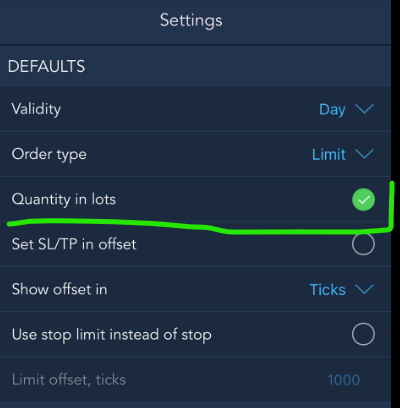
This will now set your quantity to lots (decimal points) as with the desktop app. It will now be uniform across all platforms.
If you would like to find out more about our product offerings at Sure Trading please visit our website on http://www.suretrading.co.za
Sign up for a free Velocity Trader demo or live trading account by visiting https://suretrading.tradedesk.co/
 /Blog
/Blog 