

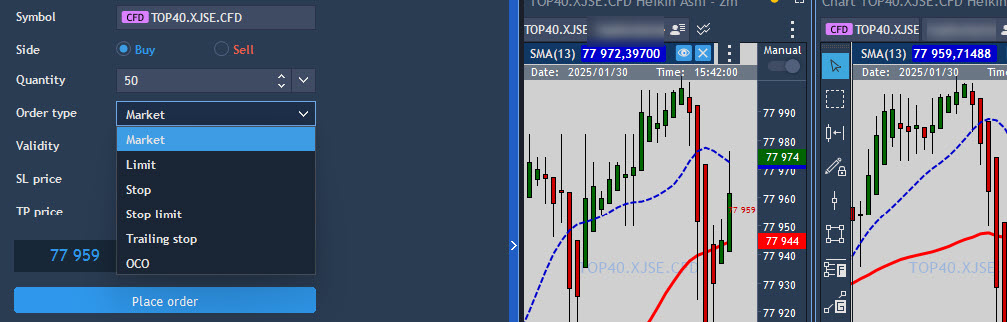
When you start trading, one of the first things you’ll come across is the different types of orders you can place. These orders tell your broker how to buy or sell an asset, and each type has its own purpose. In this lesson, we’ll look at four common order types: market, limit, stop, and stop-limit orders. Don’t worry, we’ll break them down simply and give you examples that make sense, regardless of what you’re wanting to trade.
1. Market Order
A market order is the simplest type of order. It’s an order to buy or sell something immediately at the best available price.
For example, if you want to buy shares of Capitec right now, you’d place a market order. The broker will execute the order as soon as possible, at the current market price, which could be different from the price you saw when you placed the order (because market prices are always changing).
Let’s say Capitec is trading at R2,000 per share. If you place a market order to buy 10 shares, the broker will execute the trade for you at whatever the best price is at that moment, which might be a little higher or lower than R2,000, depending on how quickly prices move.
Key point: Market orders are quick and get executed immediately, but you might not get the exact price you expect.
2. Limit Order
A limit order is a little different. With a limit order, you set the price at which you want to buy or sell something, and the trade will only be executed if that price is met or better.
For example, let’s say you want to buy shares of Shoprite, but you don’t want to pay more than R250 per share. You place a limit order to buy Shoprite shares at R250 or lower. If the price of Shoprite drops to R250 or below, your order will be filled. But if the price never hits that level, your order won’t be executed.
Limit orders are useful when you have a specific price in mind, and you’re not in a rush to make a trade. It gives you more control over the price you pay or receive.
Key point: Limit orders allow you to control the price you’re willing to accept, but there’s no guarantee that the order will be filled if the price doesn’t reach your limit.
3. Stop Order (Stop-Loss Order)
A stop order (also called a stop-loss order) is used to limit your losses or protect profits. It’s an order that gets triggered once the price of an asset hits a certain level (the stop price). Once triggered, the stop order becomes a market order.
For example, let’s say you bought shares of Sasol at R100 per share, but you want to limit your loss if the price falls. You could place a stop order at R80. If Sasol’s price drops to R80 or lower, your stop order will be activated, and your shares will be sold at the best available price (which could be higher or lower than R80).
A stop order is useful when you want to protect yourself from big losses in case the price moves against you.
Similarly, a stop order can be used as a take-profit order. Using the Sasol example from above, you can place a stop order at the R120 level if you think this is the highest level it will reach and you would like to cash out there. When it reaches the desired level, the stop order will turn into a market order and trigger, thus “taking profit” at that level.
Key point: Stop orders help protect you from losses by selling when prices drop to a certain point, and it can also be used to “cash out” when you are happy with the profit you have made.
4. Stop-Limit Order
A stop-limit order is a combination of a stop order and a limit order. With this order, you set both a stop price and a limit price. Once the stop price is reached, the order turns into a limit order, and it will only be executed at the limit price or better.
For example, let’s say you own shares of MTN, and you want to sell them if the price falls below R100, but you don’t want to sell for anything lower than R90. You could place a stop-limit order with a stop price of R100 and a limit price of R90. If MTN’s price drops to R100, the order is triggered, and it becomes a limit order to sell at R90 or higher. If the price drops too quickly and never reaches your limit, the order might not be filled at all.
Stop-limit orders offer more control than a simple stop order, but they come with the risk that the order might not be filled if the price moves too quickly.
Key point: Stop-limit orders let you set both a stop and a limit price, giving you more control, but they don’t guarantee that the trade will be completed.
To Summarize:
- Market order: Buy or sell immediately at the best available price.
- Limit order: Buy or sell at a specific price or better, but not guaranteed to be executed.
- Stop order: Automatically sell (or buy) once a price is hit to limit losses or take profits.
- Stop-limit order: Similar to a stop order, but with a limit on the price at which the trade is executed.
Why Does This Matter?
Each type of order has its place, depending on your trading goals. For example, if you’re trading shares on the JSE and want to buy or sell quickly, a market order might be the best choice. If you have a specific price in mind, a limit order can help you avoid paying more than you want. If you’re trying to protect yourself from big losses, a stop order or stop-limit order might be the way to go.
Understanding these orders and using them properly can help you trade smarter, regardless of what you are trading.
Happy trading, and remember to contact us if you are unclear about any of these concepts.
 /Blog
/Blog 