
So, you’ve just opened up an account with Velocity Trade by going to https://suretrading.tradedesk.co/ and now you want to get your feet wet and actually start trading. Whether you are wanting to trade on the demo platform or on the live platform with real money, you will first need to create your trading credentials in order to use the Windows-based desktop platforms.
Don’t worry – this is a very simple process and you’ll be trading in no time. All you have to do is follow these easy steps.
- Firstly, you need to login on https://suretrading.tradedesk.co/ (this is the account you have probably just created)
- Once logged in, you will be greeted with this screen (see image). If you don’t see this screen, click on “home” in the left margin.
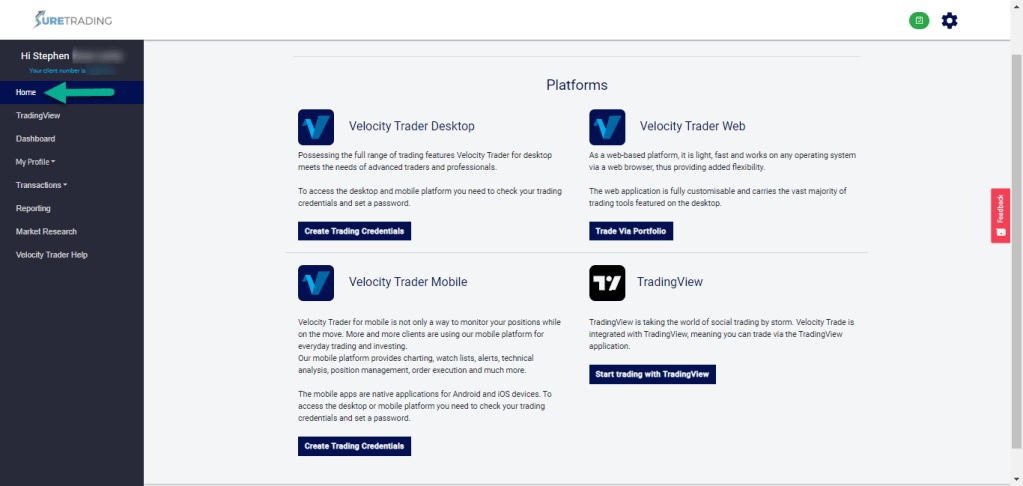
3. From here, you can either trade directly from the Velocity Trader Web platform or you can create your trading credentials for the Desktop and Mobile versions of the Velocity Trader Platform.
4. My suggestion would be to use the Velocity Trader desktop platform (Windows-based) as it is the version with the most features. So, click on “Create Trading Credentials.
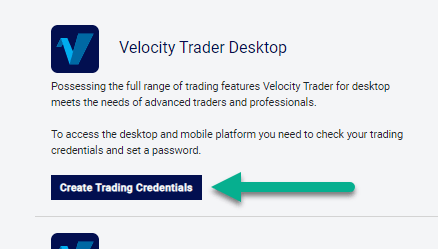
5. Next, choose if you are wanting to create credentials for your demo or live account.

6. Now you will be able to set a password.

7. Once you have chosen a password and clicked on “set password” you will be able to log in to the Velocity Trader platform with these credentials.
If you struggle at all with this process, please don’t hesitate to contact us. We are more than willing to help you out.
If you’re interested in joining our vibrant trading community, visit our website on https://www.suretrading.co.za
 /Blog
/Blog 