
It can sometimes be tricky to find the margin requirements and work out the exposure etc when you’re new to trading. This guide will show you how it’s all done and where you can find all of the info you need.
Open the Order Entry tab: Go to Terminal (Top left) and click on Order Entry.

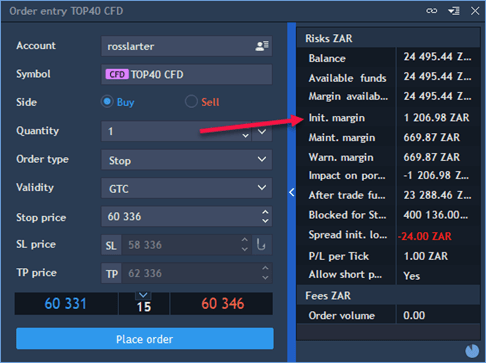
On the Order Entry tab, the margin requirement is shown per contract:
To see the margin requirement as a percentage of the value (exposure), highlight the instrument name in your watchlist, right click and choose ‘Symbol Info’:

In the Symbol Info tab, go to Margin Requirements:

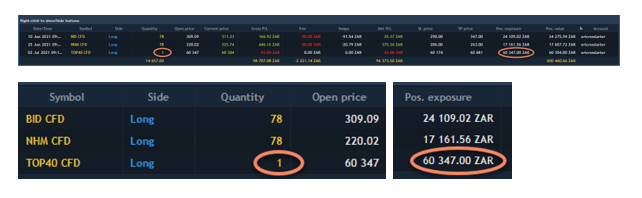
The margin requirement for the Top40 Index CFD is R1 206.98, which is 2% of the price of the index (called Position Exposure) when I entered the position, was R60 347.00:
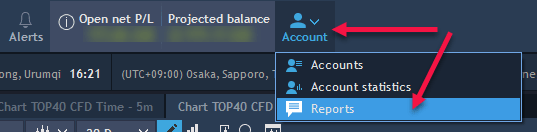
To find out what the margin is on each of your individual open positions, go to the top of your platform, and click on Account, then choose Reports:
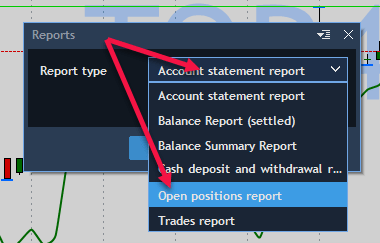
Click on drop-down next to Report type, and choose Open Positions Report:
Click on Export to Excel:


Contact us via our website or phone +27 21 674 5715 if you have any questions or queries.
 /Blog
/Blog 