
A few of our clients have, in the past, encountered an error when logging on to their platform. This error stops you from logging in as it has lost the connection settings. You can re-add them by going through the following steps:
LIVE PLATFORM
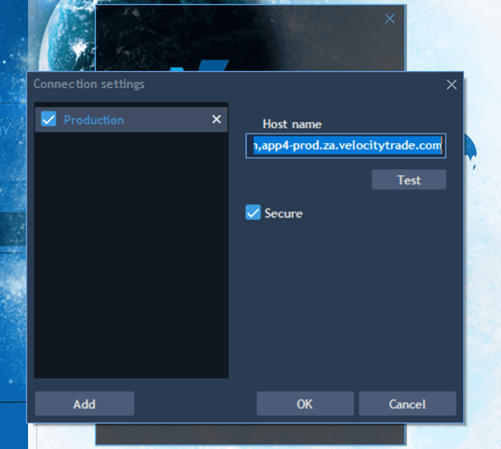
If you receive the message as per screenshot below when logging in, please follow these instructions:
- Click on Add button (bottom left)
- Right click on New Connection (called Production as seen in screenshot) and rename to Velocity Trader
- Copy and paste under Host name: app1-prod.za.velocitytrade.com,app2-prod.za.velocitytrade.com,app3-prod.za.velocitytrade.com,app4-prod.za.velocitytrade.com
- Click to tick the ‘Secure’ box
- Click on OK
The login page should reappear and you can proceed with logging in.
DEMO PLATFORM
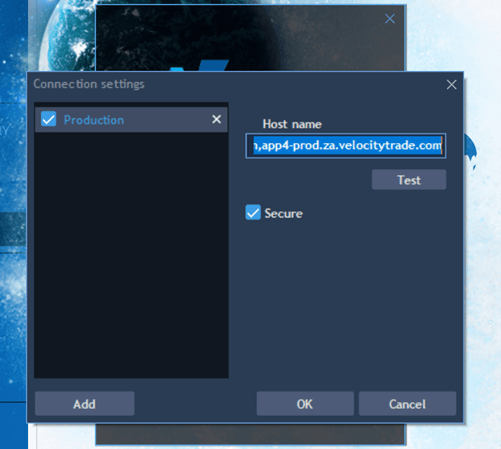
If you receive the message as per screenshot below when logging in, please follow these instructions:
- Click on Add button (bottom left)
- Right click on New Connection (called Production as seen in screenshot) and rename to Velocity Trader Demo
- Copy and paste under Host name: app1-demo.za.velocitytrade.com
- Click to tick the ‘Secure’ box
- Click on OK
The login page should reappear and you can proceed with logging in.
To find out more about our subscription service and individual mentorship please visit our website on http://www.suretrading.co.za
 /Blog
/Blog 